How to Clean a Samsung Robot Vacuum Filter
The easiest way to clean your Samsung robot vacuum filter is by gently tapping it against the trash bin to remove loose dust and debris. You can also use a soft brush for more stubborn particles. Remember, some filters are washable, but you’ll need to ensure they are completely dry before reinserting to **prevent damage** and **maintain optimal performance**.
Keeping your robot vacuum’s filter clean is essential for its effective operation. A clogged filter means your vacuum struggles to pick up dirt, leading to **less efficient cleaning** and potentially **shorter lifespan** for your appliance. Regular filter maintenance is a simple but **highly effective** way to keep your Samsung robot vacuum running smoothly.
- Tap out loose debris.
- Use a soft brush for stuck-on dust.
- Check if your filter is washable.
- Ensure washable filters are bone dry.
- Clean filters mean a cleaner home!
Let’s walk through exactly how to get that filter sparkling clean, step by step.
“`htmlYour Samsung robot vacuum filter is the unsung hero of your cleaning routine. It’s the part that catches all the tiny particles, dust bunnies, and pet dander before they recirculate in your home. When it gets clogged, your robot might sound like it’s working hard, but it’s not cleaning effectively. Let’s make sure it’s performing at its best!
Keeping Your Samsung Robot Vacuum Filter Clean
Your robot vacuum needs a clean filter to work its magic. A dirty filter is like a stuffed-up nose for your vacuum. It can’t breathe well, and therefore, it can’t suck up dirt efficiently. This means more dust in your air and on your floors, even when the robot is running. We’ll show you how to get it back in top shape.
Identifying Your Samsung Robot Vacuum Filter Type
Before you start cleaning, it’s important to know what kind of filter you have. Samsung makes different models, and they use various filter types. Some are designed for a quick tap-and-go, while others can handle a gentle wash.
Checking Your User Manual
The best place to start is always your robot vacuum’s user manual. It will tell you exactly what type of filter your model uses and the manufacturer’s recommendations for cleaning and replacement. If you can’t find the physical manual, a quick search on Samsung’s website for your specific model should bring up a digital version.
Common Samsung Filter Types
Generally, you’ll encounter a few main types:
- Standard Mesh Filters: These are often the most common and are designed for dry debris.
- Washable Filters: Some models come with filters that can be rinsed under water. These are typically made of different materials.
- HEPA-style Filters: While not always labeled as true HEPA, some filters offer advanced filtration for fine particles. These are usually not washable.
Step-by-Step Cleaning Guide for Non-Washable Filters
If your manual or filter type indicates it’s NOT washable, don’t worry! A simple cleaning routine can revive it. The goal here is to remove as much dry debris as possible without introducing moisture.
The Gentle Tap Method
This is your first line of defense. Take the filter out of your robot vacuum. Find a trash bin, preferably one with a liner. Hold the filter firmly over the bin and give it a few gentle taps or shakes. You’ll be surprised how much dust and hair will fall out. Many cleaning experts suggest this is the most effective first step.
Using a Soft Brush
For any dust or debris that’s clinging to the filter’s mesh, a soft brush is your best friend. An old, clean toothbrush or a soft-bristled cleaning brush works perfectly. Gently brush away the particles. Be thorough but avoid scrubbing too hard, which could damage the filter material. We found that brushing in the direction of the mesh can help dislodge stubborn bits.
When to Replace Your Filter
Even with regular cleaning, filters don’t last forever. If you notice the filter is torn, misshapen, or simply won’t come clean after several attempts, it’s time for a replacement. A worn-out filter can’t do its job, no matter how much you clean it. Many sources recommend replacing filters every 2-3 months, depending on usage.
Cleaning Instructions for Washable Samsung Robot Vacuum Filters
Got a filter that can get wet? That’s great news for deep cleaning! Washing your filter regularly can help maintain its performance and air quality in your home. Just remember, the key is making sure it’s 100% dry before it goes back in.
Rinsing Under Water
Start by removing the filter from your robot vacuum. Run cool or lukewarm tap water through the filter. You want to rinse it in the opposite direction of normal airflow. This helps push the trapped dirt out. Let the water flow until it runs clear. Avoid using any soaps or detergents, as these can damage the filter material and leave residue.
Allowing for Complete Drying
This is the most critical step for washable filters. After rinsing, gently shake off excess water. Then, let the filter air dry completely. Do NOT use a hairdryer, toaster oven, or any heat source to speed up drying. High heat can warp or damage the filter. Place it in a well-ventilated area, away from direct sunlight. We found it can take anywhere from 24 to 48 hours for a filter to dry thoroughly. Patience here is key to preventing issues.
Checking for Dryness
Before you reinsert the filter, give it a good once-over. Touch it, feel it. Make sure there are no damp spots, especially deep within the pleats. If it feels even slightly cool or moist, let it dry longer. Moisture left behind can lead to mold growth or damage the robot’s internal components. Imagine putting a wet sponge into your electronics; that’s what you’re trying to avoid!
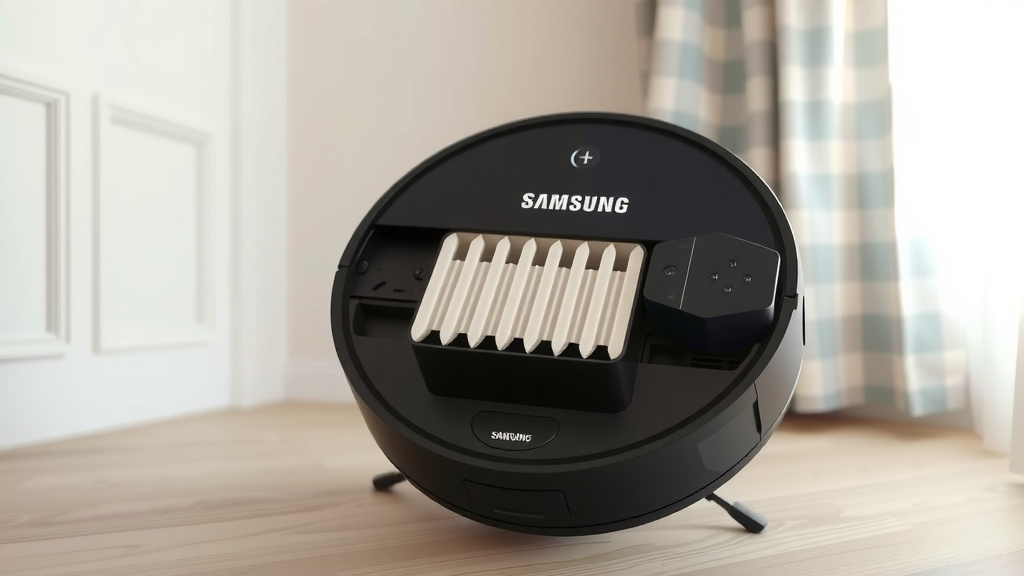
Filter Maintenance Checklist
Here’s a quick rundown to keep your filter in top condition:
- Check your manual for filter type.
- Gently tap out loose debris over a trash bin.
- Use a soft brush for stubborn dust.
- Rinse washable filters with cool water only.
- Ensure ALL filters are completely dry before reinsertion.
- Replace filters every 2-3 months or as needed.
The Benefits of a Clean Filter
Why go through all this trouble? A clean filter means your Samsung robot vacuum will perform better. You’ll notice improved suction power. Your home will feel cleaner, and the air quality may even improve. Plus, it helps extend the life of your robot. Think of it as giving your robot a fresh start for every cleaning cycle.
Keeping your filter clean is a simple act of maintenance that pays off. It ensures your robot vacuum continues to be the helpful cleaning companion you rely on. We found that a little bit of attention each week makes a big difference in the long run.
“`Conclusion
You’ve learned how to keep your Samsung robot vacuum’s filter in tip-top shape! Remember, whether your filter is washable or not, regular cleaning is key to optimal performance. Tapping out dry debris or gently rinsing washable filters prevents dust buildup and ensures your robot works efficiently. Taking a few minutes for this simple maintenance can save you time and money in the long run.
Your next step? Make filter cleaning a regular part of your robot vacuum’s routine. Check your manual, and aim to clean it weekly. This small habit will help your robot clean your home better and last longer.
Frequently Asked Questions
How often should I clean my Samsung robot vacuum filter?
We recommend cleaning your filter at least once a week. If you have pets or a very dusty home, you might find yourself cleaning it more often. Regular checks are the best way to know your specific needs.
Can I use soap or detergent to wash my Samsung robot vacuum filter?
No, please avoid using soap or detergent on washable filters. These can break down the filter material and leave residue that could harm your robot’s motor. Only use cool or lukewarm water.
What happens if I put a damp filter back into my Samsung robot vacuum?
Putting a damp filter back can cause serious problems. Moisture can damage your robot’s internal components and lead to mold growth. Always ensure washable filters are 100% dry before reinserting them.
My Samsung robot vacuum filter looks very dirty. Can I scrub it?
For non-washable filters, use a soft brush to gently remove dust. Avoid scrubbing hard, as this can damage the delicate filter material. If a filter is heavily soiled and won’t come clean with gentle methods, it’s likely time to replace it.
How do I know if I need to replace my Samsung robot vacuum filter instead of just cleaning it?
If your filter is torn, misshapen, or won’t come clean after regular cleaning attempts, it’s time for a replacement. A worn-out filter cannot trap dust effectively, even after cleaning. Most manufacturers suggest replacing filters every 2-3 months.