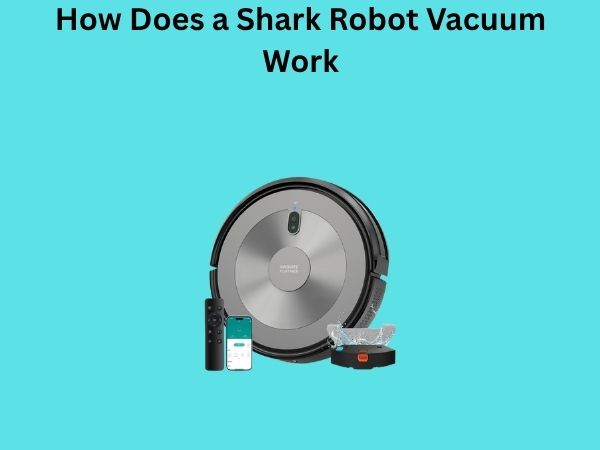
How Does a Shark Robot Vacuum Work: A Complete Technical Breakdown
Have you ever wondered what’s actually happening inside that little disc-shaped robot zipping around your living room? I mean, it’s almost magical the way it navigates your home without bumping into everything, isn’t it? Well, today we’re going to peek behind the curtain and explore exactly how a Shark robot vacuum works. Whether you’re considering buying one or you’re just curious about the technology powering these modern cleaning machines, you’re in the right place.
Understanding the Basics of Shark Robot Vacuums
Before we dive into the nitty-gritty technical details, let’s establish what makes a Shark robot vacuum different from your traditional upright vacuum sitting in your closet. A Shark robot vacuum is essentially a compact, automated cleaning device that operates independently once you set it loose in your home. Think of it like a tiny, autonomous housekeeper that never gets tired or complains about the job.
The beauty of these machines is that they’re designed to work while you’re doing other things—maybe you’re at work, spending time with family, or simply relaxing on the couch. They’re programmed to clean your floors systematically, and the smarter models even know when to dock themselves and recharge when their battery runs low.
Why Robot Vacuums Are Different
Unlike traditional vacuums that require human guidance and effort, robot vacuums are self-directed machines. They don’t rely on you pushing them back and forth. Instead, they use a combination of sensors, software, and mechanical components to make decisions about where to go and what to clean. It’s really quite fascinating when you think about it.
The Navigation System: How It Finds Its Way
So here’s where things get interesting. You might be wondering: how does this little robot actually know where it’s going? It’s not like it has a GPS system with satellite signals—after all, GPS doesn’t work reliably indoors. Instead, Shark robot vacuums use a technology called LIDAR (Light Detection and Ranging) or more basic models use structured light navigation.
LIDAR Technology Explained
Many newer Shark models feature LIDAR, which is absolutely brilliant technology. Imagine if your robot vacuum could shoot invisible laser pulses around the room hundreds of times per second, and then measure how long it takes for those pulses to bounce back. That’s essentially what LIDAR does. By analyzing these reflections, the vacuum creates a detailed map of your home in real-time.
This technology allows the vacuum to understand the layout of your rooms, identify obstacles, and determine the most efficient cleaning path. It’s like giving the vacuum a detailed blueprint of your home that it can constantly update as it moves around.
Structured Light Navigation
Some budget-friendly Shark models use structured light technology instead. This system projects patterns onto surfaces and analyzes how those patterns are distorted to understand the environment. While not quite as sophisticated as LIDAR, structured light navigation still does a pretty decent job of helping the vacuum understand its surroundings.
Visual SLAM Technology
SLAM stands for Simultaneous Localization and Mapping, and it’s a technique that allows the vacuum to track its location while simultaneously building a map of the space. The robot uses cameras and sensor data to keep tabs on where it is relative to where it’s been. This prevents the vacuum from cleaning the same spot repeatedly or getting hopelessly lost in your home.
Sensors and Detection Technology
The navigation system is just part of the story. Your Shark robot vacuum is essentially a walking (or rolling, rather) collection of sensors. These sensors are the vacuum’s eyes, ears, and sense of touch.
Bump Sensors and Collision Detection
Around the perimeter of the vacuum, you’ll find bump sensors. When the robot encounters furniture, walls, or other obstacles, these sensors detect the contact and signal the vacuum to change direction. It’s like having tiny feelers that help the vacuum gently navigate around your home without causing damage.
Infrared Sensors for Obstacle Avoidance
Beyond just bumping into things, modern Shark vacuums use infrared sensors to detect obstacles before they actually collide with them. These sensors emit infrared light and measure the reflections to identify objects in the vacuum’s path. It’s preventative rather than reactive, which means fewer collisions with your furniture and lower risk of the vacuum getting stuck.
Dirt Detection Sensors
Here’s something clever: Shark robot vacuums actually have sensors that detect when an area is particularly dirty. These sensors can identify higher concentrations of dust and debris, and the vacuum will spend more time cleaning those spots. It’s like the vacuum is doing a quick scan to see which areas need a little extra attention.
The Cleaning Mechanism Explained
Now, let’s talk about what actually happens when your Shark vacuum is cleaning. This is where the rubber meets the road, so to speak.
The Brush Roll and Main Suction
At the bottom of your Shark robot vacuum, you’ll find a motorized brush roll that spins rapidly. This brush roll works in tandem with the vacuum’s suction system to lift dirt, dust, and debris from your floors. The brushes agitate the carpet fibers or smooth surfaces, loosening particles so the suction can pull them up.
The suction itself is generated by a motor connected to a fan system. This creates negative pressure that literally pulls air and particles into the vacuum’s collection bin. The stronger the motor, the more suction power you have, and generally, the better your cleaning performance will be.
Side Brush for Edge Cleaning
Most Shark robot vacuums also feature a side brush positioned at an angle on the front or side of the unit. This brush sweeps debris toward the main brush roll, ensuring that particles near walls and in corners get picked up. It’s essentially a helper brush that extends the cleaning reach beyond what the main brush roll alone could achieve.
Two-Stage Suction System
Many Shark models employ a two-stage filtration and suction system. The first stage pulls large debris like crumbs and pet hair into the collection bin. The second stage captures finer dust particles. This design prevents the vacuum from overloading and losing suction efficiency.
Battery and Power Management
Now, how does this little robot keep going? Obviously, it needs power, and that power comes from a rechargeable lithium-ion battery—the same type of battery technology used in your smartphone.
Battery Capacity and Runtime
Most Shark robot vacuums have battery capacities ranging from 2600mAh to 5200mAh, which typically provides between 60 to 120 minutes of cleaning time per charge, depending on the model and cleaning mode. If you have a larger home, this might mean the vacuum needs to return to its dock to recharge before finishing the entire floor.
Smart Charging and Dock Navigation
Here’s where it gets smart. When the battery level drops below a certain threshold, the vacuum doesn’t just randomly wander until it dies. Instead, it uses its navigation system to locate its dock station and return to it automatically. The vacuum can recognize the dock’s infrared signals and use them to navigate back precisely. It’s like the vacuum has a mental image of where home is.
Auto-Resume Feature
After the vacuum finishes charging, many models have an auto-resume feature. This means the vacuum will pick up where it left off, returning to the room it didn’t finish cleaning and continuing its work. It’s efficiency at its finest.
Smart Home Integration and App Control
One of the things that separates modern Shark robot vacuums from older models is their connectivity. Many newer Shark vacuums can connect to your home’s WiFi network and integrate with smart home systems.
Mobile App Functionality
Through the Shark app, you can start, stop, or schedule cleaning sessions remotely. You can see a map of your home and the cleaning progress in real-time. Some models even allow you to draw virtual boundaries on the map to prevent the vacuum from entering certain areas, like a baby’s playpen or a room where you don’t want it to go.
Voice Assistant Compatibility
Many Shark robot vacuums work with voice assistants like Amazon Alexa or Google Home. This means you can literally tell your vacuum to start cleaning just by using your voice. “Alexa, start the living room cleaning” might sound like science fiction, but it’s completely normal now.
Scheduling and Automation
You can program your vacuum to clean on a regular schedule. Maybe you want it to run every Monday and Thursday at 10 AM. You can set it and forget it. The vacuum will automatically start at the designated time and follow the programmed cleaning pattern.
Dirt Collection and Filtration System
All the suction in the world doesn’t mean much if the dirt and debris can’t be properly collected and filtered. Let’s examine how Shark vacuums handle this.
Dust Bin Design
Your Shark robot vacuum has a relatively small dust bin compared to traditional vacuums, usually with a capacity of 0.5 to 0.7 liters. This means you’ll need to empty it more frequently than a full-sized vacuum, but that’s a trade-off for convenience. The dust bin is designed for quick removal and emptying—usually, you just press a button and the bin pops out.
Multi-Stage Filtration
The filtration system in your Shark robot vacuum typically includes a pre-filter and a HEPA filter. The pre-filter catches larger particles like pet hair and crumbs, while the HEPA filter captures smaller particles and allergens. This two-pronged approach helps maintain suction performance and keeps the air in your home cleaner.
Filter Maintenance
Over time, filters become clogged with dust and lose effectiveness. Most Shark models have a filter that should be cleaned or replaced every two to three weeks, depending on your home’s dust levels and how frequently you use the vacuum. Regular filter maintenance is crucial for optimal performance.
Movement and Wheel Design
You might think wheels are wheels, but the engineering behind a robot vacuum’s mobility is more sophisticated than you’d expect.
Wheel Configuration
Most Shark robot vacuums use three wheels: two larger drive wheels on the sides and one smaller wheel in front that acts as a caster. This configuration allows the vacuum to turn easily and navigate tight spaces. The drive wheels are powered by individual motors, giving the vacuum precise control over its movement.
Traction and Surface Adaptation
The wheels are designed with specific tread patterns to maximize traction on various floor types. Whether you have hardwood floors, tile, or carpet, the wheels need to grip effectively. Some models even adjust their motor power based on the surface type for optimal cleaning performance.
Climbing Ability
Many Shark robot vacuums can climb over small thresholds and transitions between different floor types. The wheel diameter and motor power determine how significant an obstacle the vacuum can overcome. However, there are limits—tall door frames or very thick rugs can still pose problems.
Cliff Detection: Staying Safe on Stairs
One of the most important safety features in any robot vacuum is cliff detection. The last thing you want is your expensive robot vacuum tumbling down a flight of stairs.
Infrared Cliff Sensors
Shark robot vacuums use infrared sensors positioned on the bottom to detect drops in floor level. These sensors emit IR light downward and measure how quickly it reflects back. If the reflection indicates a sudden drop or absence of floor beneath the vacuum, the sensors trigger an immediate halt and direction change.
How Effective Is Cliff Detection
While cliff detection is generally very reliable, it’s not 100 percent foolproof. In rare instances, cliff sensors might fail to detect a drop if they’re dirty, or if the floor is dark and doesn’t reflect IR light well. It’s still wise to set up physical barriers at the top of stairs when you first start using your robot vacuum.
Scheduling and App Control Features
Beyond the basic ability to clean, modern Shark vacuums offer sophisticated scheduling options that integrate with your lifestyle.
Customized Cleaning Zones
Using the mobile app, you can define specific zones in your home and schedule cleaning for those areas only. Maybe the kitchen gets messier and needs cleaning more often than the bedroom. You can set up separate schedules for each zone.
No-Go Zones and Virtual Walls
If there are areas where you don’t want the vacuum to venture, you can create virtual barriers within the app. These invisible walls tell the vacuum not to cross certain boundaries. It’s perfect for keeping your robot out of rooms with delicate items or areas with hazards.
Maintenance and Care
To keep your Shark robot vacuum running smoothly, regular maintenance is essential.
Regular Cleaning Tasks
- Empty the dust bin after each cleaning cycle
- Clean the brush roll weekly to remove tangled hair
- Wipe the sensors with a dry cloth monthly
- Check the wheels for debris and clean as needed
- Replace filters every 2-3 weeks or as recommended
Professional Servicing
If your vacuum starts making unusual noises or loses suction despite maintenance, it might be time for professional servicing. Shark offers customer support and repair services for issues that go beyond basic maintenance.
Troubleshooting Common Issues
Despite their sophistication, robot vacuums can encounter problems. Let’s look at some common issues and their solutions.
Lost Suction Power
If your vacuum isn’t picking up dirt as well as it used to, the first thing to check is the filter. A clogged filter dramatically reduces suction. After cleaning or replacing the filter, also check the brush roll for hair and debris that might be restricting airflow.
Navigation Issues
If your vacuum seems confused about where it is or gets stuck repeatedly in the same spot, try resetting its map. Clean the sensors with a dry cloth to ensure they’re functioning properly. Also, make sure your home’s lighting is adequate—dim rooms can sometimes confuse optical sensors.
Charging Problems
If

![7 Best Affordable Robot Vacuum For Pets [2026]](https://robotvacuumfact.com/wp-content/uploads/2026/06/7-best-affordable-robot-vacuum-for-pets-2026-featured-768x432.jpg)