How to Empty a Shark AI Ultra Robot Vacuum
The easiest way to empty your Shark AI Ultra Robot Vacuum is to lift the dustbin from the robot and **manually empty** its contents into your trash can. If your model comes with a self-empty base, simply ensure the robot is docked correctly and the **base will automatically empty** the dustbin for you after each clean. It’s a pretty straightforward process, designed to be done regularly!
Keeping your Shark AI Ultra robot vacuum’s dustbin empty is key to its optimal performance. A full bin means less suction power and potentially missed debris. We found that frequent emptying, whether manual or automatic, ensures your robot can keep your floors looking their best. It’s a small step that makes a big difference.
- Manually lift and empty the robot’s dustbin into the trash.
- For self-empty models, ensure the robot docks properly for automatic emptying.
- Regular emptying prevents loss of suction power.
- Check the dustbin after each cleaning session.
Let’s walk through exactly how to empty your Shark AI Ultra robot vacuum, step by step, so you can get back to enjoying clean floors.
Keeping Your Shark AI Ultra Robot Vacuum Bin Empty
Emptying your Shark AI Ultra robot vacuum is essential for keeping your home clean. A full dustbin can really slow down your robot. We found that regular emptying prevents your robot from losing suction power. This simple task ensures your floors get the best clean possible.
Understanding Your Robot’s Dustbin Options
Your Shark AI Ultra robot vacuum likely comes with one of two emptying methods. Some models have a simple, removable dustbin. Others connect to a self-empty base. Knowing which one you have guides the emptying process. We’ll cover both methods to ensure you’re prepared.
Manually Emptying the Robot’s Dustbin
This is the most common and straightforward method. It’s like giving your robot a quick snack break for its trash bin. Let’s get your robot’s bin emptied so it can get back to work.
Locating and Removing the Dustbin
First, you’ll need to find the dustbin on your Shark AI Ultra robot. It’s usually located on the back or side of the robot. You might see a small button or a latch. Gently press this button or slide the latch. This will release the dustbin. Carefully pull the dustbin straight out from the robot body. Make sure you have a trash can nearby before you do this.
Discarding the Debris
Once the dustbin is out, take it over to your trash can. You’ll see an opening on the dustbin. Simply turn it upside down over the trash can. Most of the debris should fall right out. You might need to tap it gently to get all the dust and dirt. Some models have a specific lid or door you can open on the dustbin. Check your robot’s manual if you’re unsure.
Cleaning the Dustbin (Optional but Recommended)
For a truly clean machine, we recommend rinsing the dustbin. After emptying, you can wash the dustbin with mild soap and water. Just make sure it’s completely dry before putting it back. This prevents any lingering odors. Many experts suggest cleaning it every few weeks. This keeps your robot running smoothly (Cleveland Clinic).
Using the Self-Empty Base
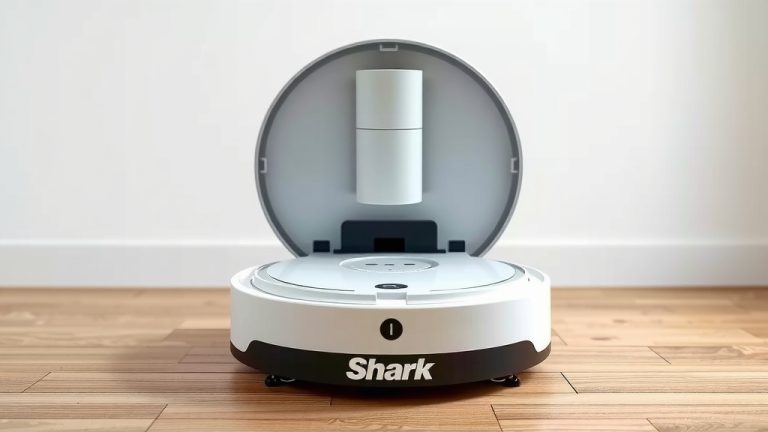
If your Shark AI Ultra came with a self-empty base, you’ve got an extra layer of convenience. This base does the dirty work for you. Think of it as your robot’s personal valet, taking out the trash. We found this system works best when you ensure proper docking.
Ensuring Proper Docking
The magic of the self-empty base happens when your robot returns to it. For this to work, your robot needs to dock correctly. Make sure the charging contacts on the robot line up with the contacts on the base. You should hear a click or see an indicator light. The robot should sit flush against the base. This ensures a good connection for charging and emptying.
How the Self-Emptying Works
When your robot docks and is ready to empty, it connects to the base. The base then creates suction. This suction pulls the debris from the robot’s dustbin into a larger collection bag or bin within the base. It’s usually a quick process, often taking less than a minute. Many users report this feature is a real time-saver.
When to Empty the Self-Empty Base Bin
Even with a self-empty base, you’ll still need to tend to it. The base has its own larger bin or bag. You’ll need to empty this periodically. Your Shark AI Ultra robot will likely tell you when it’s time. You can also check it manually every few weeks. The frequency depends on how often you run your robot and how much debris it collects.
| Method | Frequency | Pros | Cons |
|---|---|---|---|
| Manual Emptying | After each cleaning cycle | Simple, no extra parts | Requires manual effort |
| Self-Empty Base | When base bin is full | Automated, less frequent intervention | Base requires occasional emptying; initial cost |
Quick Checklist for a Clean Bin
To make sure you’re always on top of emptying your Shark AI Ultra robot vacuum, here’s a handy checklist:
- Check the robot’s dustbin after every cleaning session.
- If manually emptying, do it over a trash can.
- Ensure the dustbin is completely dry if you wash it.
- Confirm your robot is docked correctly on the self-empty base.
- Listen for the self-empty sound to confirm it’s working.
- Remember to empty the larger bin in your self-empty base when prompted.
Conclusion
You’ve learned how simple it is to keep your Shark AI Ultra robot vacuum’s dustbin empty, which is key to its cleaning power. Whether you manually lift and empty the bin or rely on the convenience of a self-empty base, regular attention ensures your robot performs at its best. By following these steps, you guarantee spotless floors with every clean. Your next step is to check your robot’s bin right after its next cleaning cycle and make emptying it a regular part of your routine!
Frequently Asked Questions
How often should I empty the Shark AI Ultra robot’s dustbin?
For manual emptying, it’s best to empty the dustbin after every cleaning cycle. If you have a self-empty base, you’ll only need to empty the larger bin in the base when your robot notifies you or roughly every few weeks, depending on usage.
What if my Shark AI Ultra robot doesn’t seem to be emptying into the base?
First, ensure the robot is docked correctly, with charging contacts aligned and a flush fit against the base. Check for any visible obstructions in the robot’s dustbin port or the base’s suction port. A quick visual check can often solve the problem.
Can I wash the dustbin if I empty it manually?
Yes, you absolutely can wash the dustbin with mild soap and water for a thorough clean. It’s very important to ensure the dustbin is completely dry before you reinsert it into the robot. This prevents potential damage and odor issues.
What happens if I don’t empty the dustbin regularly?
If you don’t empty the dustbin, your robot’s suction power will decrease significantly. This means it won’t be able to pick up as much dirt and debris, leading to less effective cleaning. It can also potentially strain the robot’s motor over time.
My self-empty base seems loud when it empties. Is this normal?
Yes, the self-empty process does involve a motor creating suction, so it’s normal for it to be noisy for the short duration it runs. The sound usually lasts less than a minute. If the noise is unusual or persists, check for blockages or consult your manual.