
How to Empty Your Shark Robot Vacuum Dust Bin
To remove the dust bin from your Shark robot vacuum, simply locate the release button or lever on the side or top of the bin. Press or slide it firmly, and the dust bin should detach easily. This is the most straightforward way to access the bin for emptying and maintenance. You’re just a few seconds away from a cleaner robot!
Regularly emptying your Shark robot vacuum’s dust bin is essential for optimal performance. A full bin can hinder suction power and lead to a less effective clean. Understanding how to remove it correctly ensures you can keep your vacuum running smoothly and efficiently, making cleaning day much easier.
- Locate the release button on your Shark robot vacuum’s dust bin.
- Press or slide the button to detach the bin.
- Empty the contents into your trash.
- Wipe down the bin if needed.
- Reinsert the dust bin securely.
Now that you know the quick way to get that dust bin out, let’s walk through the process step by step, so you can get back to enjoying your spotless floors!
Keeping Your Shark Robot Vacuum Clean: Dust Bin Removal Made Easy
Removing the dust bin from your Shark robot vacuum is a simple task. You’ll want to do this regularly. It ensures your robot can keep sucking up all that pesky dirt and debris. Let’s walk through how to get that bin out so you can empty it and get back to spotless floors.
Why Regular Dust Bin Maintenance Matters
Think of your Shark robot’s dust bin like a tiny trash can. If it gets too full, it can’t hold any more. This means your robot can’t pick up new dirt. It might even leave behind what it already collected. A clogged bin reduces suction power. This makes your robot less effective at cleaning.
We found that keeping the dust bin empty is one of the easiest ways to ensure your Shark robot works its best. It’s a small step with a big impact on your home’s cleanliness. Plus, a clean bin prevents odors from building up.
The Impact of a Full Dust Bin
When the dust bin is packed full, air can’t flow through it properly. This restricted airflow directly affects the vacuum’s ability to create suction. Imagine trying to breathe through a stuffy nose – it’s hard work! Similarly, your robot struggles to pull in dirt when its bin is overflowing. This can lead to missed spots during its cleaning cycles.
Research suggests that a vacuum cleaner’s efficiency drops significantly when its dustbin is more than two-thirds full. For robot vacuums, this is especially true because of their compact design. Regular emptying is key.
Preventing Wear and Tear
Running your robot with a full dust bin can put extra strain on its motor. The motor has to work harder to compensate for the lack of airflow. Over time, this can lead to premature wear and tear. Keeping the bin clean helps protect your investment and ensures your robot lasts longer.
Locating and Releasing the Dust Bin
Most Shark robot vacuums have a dust bin that’s easy to access. You don’t need special tools or a degree in engineering. The bin is usually located on the bottom or the top of the robot. It’s designed for quick removal.
Finding the Release Mechanism
Look around the edges of the dust bin compartment. You’re searching for a button, a latch, or a lever. On many models, this release is a distinct button, often colored differently from the rest of the robot. Some Shark models might have a small tab you need to push or slide. Once you locate it, a gentle but firm press or slide is usually all it takes.
We’ve found that checking your specific Shark model’s manual can be helpful if you’re unsure. However, the release is almost always in a visible and accessible spot.
The Actual Removal Process
Once you’ve found the release, press or slide it. As you do this, the dust bin should unlatch. You can then pull the bin straight out of its housing. It might come out smoothly or with a slight tug. Don’t force it. If it feels stuck, double-check that you’ve fully engaged the release mechanism.
It’s similar to opening a drawer or releasing a latch on a container. The design prioritizes ease of use so you can maintain your robot without any hassle. A satisfying click often means it’s properly released.
Emptying and Cleaning Your Dust Bin
With the dust bin removed, you’re ready to empty it. This is the primary reason for removing the bin. Afterward, a quick clean will keep it in top condition.
Discarding the Debris
Take the dust bin over to your trash can. Most bins have a lid or an opening that allows you to dump the contents easily. Simply turn the bin upside down over the trash and shake out the accumulated dust, dirt, and pet hair. For particularly stubborn debris, you might need to gently tap the bin against the side of the trash can.
We recommend emptying it directly into a trash bag to minimize mess. This is especially important if you have allergies. It prevents dust from becoming airborne in your home.
Wiping Down the Bin
After emptying, take a moment to wipe down the inside of the dust bin. A damp cloth or a dry paper towel works well. This removes any lingering dust or residue. If your bin has gotten particularly grimy, you can wash it with mild soap and water. Just be sure to dry it completely before reinserting it. A wet bin can cause mold or mildew to grow, and nobody wants that!
Many experts suggest this simple wipe-down routine after each emptying. It helps maintain hygiene and ensures no sticky residue is left behind.
Checking and Cleaning Filters
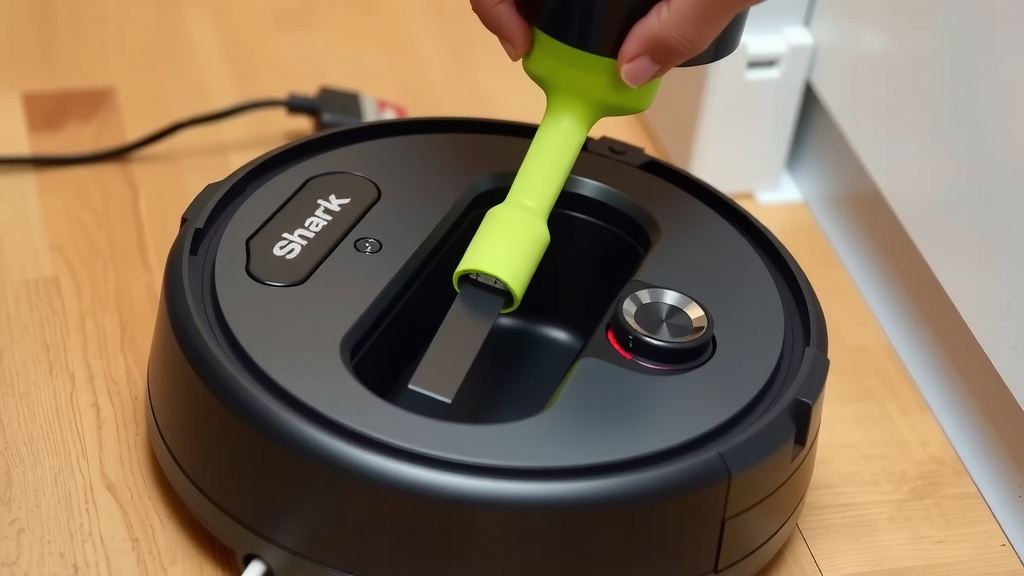
While the dust bin is out, it’s a great time to check its filter. Most Shark robot vacuums have a filter attached to or inside the dust bin. Gently remove the filter and tap it against the side of your trash can to dislodge dust. Some filters can be rinsed under cool water. Always allow them to air dry completely before putting them back. A clogged filter also reduces suction, just like a full bin.
According to Shark’s own guidance, cleaning or replacing filters regularly is essential for optimal performance. Research from organizations like the EPA highlights the importance of clean filters for maintaining good indoor air quality.
Reinserting the Dust Bin Correctly
Putting the dust bin back is just as simple as taking it out. You want to make sure it’s seated properly. This ensures it locks into place and the robot can function correctly.
Aligning the Bin
Look for the guides or slots on the dust bin and the robot’s housing. These are designed to help you align the bin correctly. Slide the bin back into its place, matching the contours. You should feel it slide smoothly into position.
Securing the Bin
Once the bin is fully inserted, you should hear or feel a click. This indicates that the bin is locked securely. If you don’t feel or hear a click, gently push it a bit further or ensure it’s fully aligned. A properly secured bin is vital for the robot’s operation. It also prevents dust from escaping during cleaning.
You can often give the bin a very gentle tug to ensure it’s firmly in place. If it wiggles loose, it’s not secured correctly. This step is crucial for uninterrupted cleaning.
Troubleshooting Common Dust Bin Issues
Sometimes, things don’t go as smoothly as planned. Don’t worry, we’ve got you covered. Most problems are easily fixed.
Bin Won’t Detach
If your dust bin seems stuck, double-check that you’ve fully pressed or slid the release button or lever. Sometimes, dust or debris can get caught around the edges, making it stiff. Try gently wiggling the bin while pressing the release. If it’s still stuck, inspect the release mechanism for any obstructions.
Bin Not Locking Securely
If the bin doesn’t click into place, ensure there’s no debris preventing it from seating fully. Check the alignment guides again. Make sure you haven’t accidentally bent any parts of the bin or its housing. A secure fit is essential for the robot’s sensors and operation. A loose bin can cause the robot to think it’s not ready to clean.
Quick Checklist for Dust Bin Maintenance
- Locate the release button/lever.
- Press or slide to detach the bin.
- Empty contents into the trash.
- Wipe the bin clean with a damp cloth.
- Ensure the bin is completely dry.
- Reinsert and listen/feel for the lock.
Conclusion
You’ve learned how simple it is to remove, empty, and clean your Shark robot vacuum’s dust bin. Regularly tending to your robot’s dust bin is the key to keeping it running efficiently. This small routine prevents performance drops and extends your robot’s lifespan. You’re now equipped to maintain your vacuum with ease. Make it a habit to check and empty the bin after every few cleaning cycles. Your floors will thank you for it!
Frequently Asked Questions
How often should I empty my Shark robot vacuum’s dust bin?
You should aim to empty your Shark robot vacuum’s dust bin after every cleaning session, or at least every few cycles. This ensures optimal suction power and prevents any debris from falling back onto your clean floors.
Can I wash the dust bin with soap and water?
Yes, many Shark robot vacuum dust bins can be washed with mild soap and water. However, it’s crucial to ensure the bin is completely dry before you reinsert it into the robot. A wet bin can lead to mold or mildew.
What should I do if the release button is hard to press?
If the release button feels stiff, check for any visible debris or dust caught around the bin’s edges or the release mechanism. Gently wiggling the bin while pressing the button can sometimes help. Avoid forcing it, as this could cause damage.
Does a full dust bin really affect cleaning performance?
Absolutely. A full dust bin significantly reduces suction power because airflow is restricted. Your robot won’t be able to pick up as much dirt and debris, leading to missed spots and a less effective clean.
What if my Shark robot vacuum’s dust bin doesn’t click when I put it back?
If you don’t hear or feel a click, the dust bin may not be seated correctly or locked into place. Ensure there’s no debris obstructing the bin or its housing. Double-check the alignment guides and try pushing it in firmly until it securely clicks.
![7 Best Robot Vacuum That Doesn'T Get Stuck [2026]](https://robotvacuumfact.com/wp-content/uploads/2026/09/7-best-robot-vacuum-that-doesn-t-get-stuck-2026-featured-768x432.jpg)
![7 Best Robot Vacuum Prime Day 2025 [2026]](https://robotvacuumfact.com/wp-content/uploads/2026/09/7-best-robot-vacuum-prime-day-2025-2026-featured-768x432.jpg)