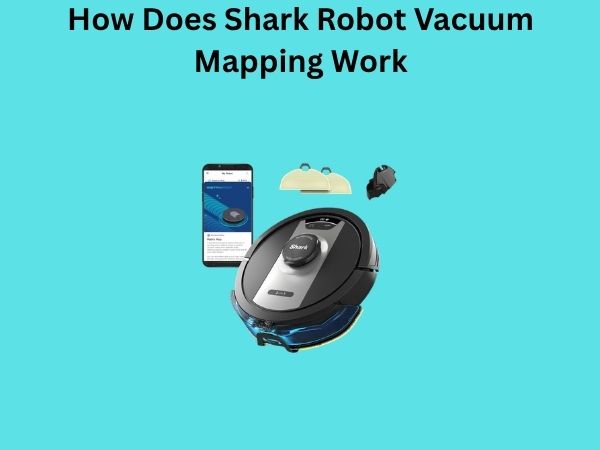
How Does Shark Robot Vacuum Mapping Work? A Complete Guide to Smart Cleaning Navigation
Have you ever wondered how your Shark robot vacuum seems to know exactly where it’s been and where it needs to go next? It’s not magic, and it’s definitely not random wandering. There’s actually a sophisticated system working behind the scenes that allows these little cleaning machines to navigate your home with impressive precision. In this guide, I’m going to break down everything you need to know about Shark robot vacuum mapping technology, how it actually works, and why it matters for your cleaning routine.
Understanding the Basics: What is Robot Vacuum Mapping?
Let me start with the fundamentals. Robot vacuum mapping is essentially the process by which a robotic vacuum creates a digital blueprint of your home. Think of it like how you might sketch out a map of your neighborhood on a piece of paper—except the vacuum does this digitally and in real-time as it moves through your space.
When a Shark robot vacuum operates, it’s constantly collecting data about its surroundings. This information gets processed into a map that the vacuum uses to plan its cleaning routes efficiently. Without mapping technology, your vacuum would just bump around randomly, which would waste time, battery life, and wouldn’t give you the thorough cleaning you deserve.
The Technology Behind Shark Mapping Systems
LIDAR Technology: The Primary Mapping Tool
Most modern Shark robot vacuums rely on LIDAR technology, which stands for Light Detection and Ranging. I know that sounds technical, but here’s what it actually does: LIDAR uses laser pulses to measure distances between the vacuum and objects around it. The vacuum shoots out these laser beams in all directions, and when they bounce back, the system calculates how far away walls, furniture, and other obstacles are.
This creates what’s called a point cloud—imagine thousands of tiny dots mapping out the perimeter and contents of your room. This data gets refined into a clean, usable map that helps the vacuum understand the layout of your home. It’s incredibly fast and accurate, which is why LIDAR has become the industry standard for high-end robot vacuums.
Visual Camera Mapping Systems
Some Shark models also incorporate camera-based mapping, which uses visual sensors to understand your environment. These cameras capture images as the vacuum moves, and specialized software processes what the camera sees to identify objects, room boundaries, and potential obstacles. It’s similar to how you navigate your own home using your eyes.
The advantage of camera systems is that they can recognize specific objects—like shoes, toys, or cords—which helps the vacuum avoid them more effectively. However, cameras work better in well-lit environments, which is why many Shark vacuums use a combination of both LIDAR and camera technology for maximum effectiveness.
Gyroscope and Accelerometer Sensors
Beyond the main mapping tools, Shark vacuums use gyroscopes and accelerometers to track their movement. These sensors monitor the vacuum’s direction, speed, and rotation. It’s like the vacuum’s internal compass and odometer combined. When LIDAR creates the map structure, these sensors help the vacuum know exactly where it is on that map at any given moment.
How Shark Vacuums Build Maps in Real-Time
The First Run: Initial Mapping Phase
When you first run your Shark robot vacuum, it enters what I like to call the learning phase. During this initial run, the vacuum doesn’t jump straight into aggressive cleaning mode. Instead, it moves methodically through your home, gathering data about the layout. This is why you’ll notice your vacuum moving a bit slower on its first run—it’s being thorough and careful.
During this phase, the vacuum is essentially taking a complete survey of your space. It’s identifying wall locations, detecting doorways between rooms, locating furniture, and noting any obstacles. All of this information gets compiled into a comprehensive map of your home.
Creating Room-by-Room Maps
What’s particularly clever about Shark mapping is that it doesn’t just create one big map of your entire home. Instead, it breaks things down into individual rooms. The vacuum recognizes when it moves from one room to another and creates separate maps for each space. This is incredibly useful because it allows you to set cleaning preferences on a room-by-room basis.
For example, you might want your kitchen cleaned more frequently than your bedroom. With room-separated mapping, you can tell the app exactly which rooms you want cleaned and how often. The vacuum remembers these preferences and adjusts its cleaning schedule accordingly.
Continuous Updates and Refinement
Here’s something many people don’t realize: the mapping doesn’t stop after that first run. Every time your Shark vacuum operates, it’s continuously updating and refining its map. If you’ve moved furniture around, the vacuum detects this change. If you’ve reorganized your living space, the map gets updated. This adaptive mapping ensures that your vacuum is always working with current, accurate information about your home’s layout.
Smart Navigation: How Vacuums Use Maps to Clean Efficiently
Grid-Based Cleaning Patterns
Once your Shark vacuum has mapped your home, it doesn’t clean randomly. Instead, it uses intelligent algorithms to plan efficient cleaning routes. Most modern Shark vacuums employ a grid-based cleaning pattern, which means they divide rooms into imaginary squares and clean each square systematically.
This approach is far more efficient than the old random-bump style of cleaning. Rather than covering the same spots multiple times and missing others entirely, grid cleaning ensures that every square inch of your floor gets covered—and only once per cleaning cycle. This saves battery life and gets your floors cleaner in less time.
Boundary Recognition and No-Go Zones
Through mapping, Shark vacuums can recognize boundaries. They understand where walls are and how to navigate along them effectively. But more importantly, through the associated smartphone app, you can set virtual boundaries called no-go zones or restricted areas.
Want to keep the vacuum out of your home office? You can draw a virtual boundary on the app, and the vacuum will recognize that area and avoid it. Want certain rooms cleaned while others stay off-limits? The mapping system makes this possible. The vacuum won’t cross these digital boundaries, which gives you complete control over where your vacuum can and cannot go.
Dock Recognition and Return Navigation
Here’s another brilliant aspect of mapping technology: the vacuum knows exactly where its charging dock is located. Using its map and navigation sensors, the Shark vacuum can navigate back to the dock from anywhere in your home when its battery gets low. There’s no guessing, no wandering around lost trying to find the dock.
The vacuum remembers the dock’s position in its map and calculates the most efficient route back to it. This is why a properly placed dock—with clear access from multiple directions—is so important for your system’s functionality.
The Shark Mobile App and Mapping Visualization
Viewing Your Home’s Map
One of my favorite features of Shark robot vacuums is that you can actually see the map that the vacuum has created. Through the Shark mobile app, you can view a real-time map of your home showing the vacuum’s current location, the areas it has cleaned, and the overall layout it has detected.
This visualization is more than just cool to look at—it’s genuinely useful. If you notice something wrong with the map, like a wall that’s in the wrong place or a room that’s not being recognized correctly, you can see it right away and address any issues.
Editing and Customizing Your Maps
The app doesn’t just show you maps; it lets you edit them. You can rename rooms, adjust room boundaries, and set specific cleaning preferences for each space. If the vacuum has misidentified a room or merged two rooms together, you can split them back apart. This level of customization ensures that the mapping system works exactly the way you want it to.
Multi-Floor Mapping Capabilities
If you have a multi-story home, certain Shark models can handle mapping for multiple floors. The vacuum remembers which floor it’s on and maintains separate maps for each level. Some advanced models can even switch between floors intelligently, though you’ll need to manually move the dock when you want the vacuum to clean a different level.
Common Mapping Issues and How They’re Resolved
Map Errors and How to Fix Them
Occasionally, your Shark vacuum’s map might get confused. Maybe it merged two rooms together, or it misidentified a hallway. These errors usually happen because of poor lighting, reflective surfaces, or sudden changes in your home’s layout.
The good news is that these issues are usually easy to fix. You can manually edit the map through the app, or you can run a new mapping cycle to let the vacuum re-learn your space. Sometimes simply repositioning the dock or improving lighting in problematic areas resolves the issue naturally.
Improving Mapping Accuracy in Challenging Spaces
Some homes have features that make mapping trickier. Open floor plans, rooms with very high ceilings, or spaces with lots of mirrors can confuse mapping sensors. If you’re experiencing mapping issues in certain areas, here are some tips:
- Ensure adequate lighting throughout your home, especially in hallways and transitions between rooms
- Minimize clutter during the initial mapping phase so the vacuum can see room boundaries clearly
- Keep reflective surfaces like mirrors and glass doors closed during mapping if possible
- Avoid scheduling initial mapping during times when natural light is poorest
- Make sure the dock is in a location with good sensor range for the vacuum to detect it
Privacy and Data Security in Mapping Systems
How Your Home Data is Protected
I know what some of you are thinking: isn’t having a camera-equipped robot vacuum in your home a privacy concern? It’s a valid question. Shark has implemented several security measures to protect your data. Maps created by your vacuum are encrypted and stored either locally on the device or in secure cloud servers with authentication requirements.
The images and data collected during mapping are processed primarily on the device itself rather than being sent to external servers. This means your home’s layout and the images captured stay within your home network most of the time.
Understanding Data Storage Options
Most Shark vacuums give you options for how your data is handled. You can choose to store maps locally only, use cloud storage for convenience, or opt out of certain data collection features. It’s important to review these settings during setup so you’re comfortable with how your information is being managed.
Comparing Shark Mapping to Other Brands
While Shark uses excellent mapping technology, it’s worth noting how it stacks up against competitors. Most premium robot vacuums from brands like iRobot, Samsung, and others also use LIDAR and camera-based mapping systems. What sets Shark apart is often the balance between performance and price—you get solid mapping technology without necessarily paying premium prices.
Shark’s integration with third-party ecosystems like Alexa and Google Home also adds flexibility to how you control and monitor your vacuum’s mapping and cleaning functions.
Future Developments in Robot Vacuum Mapping
Artificial Intelligence and Machine Learning
The future of robot vacuum mapping involves increasingly sophisticated artificial intelligence. Shark and other manufacturers are developing vacuums that can learn your habits, predict your cleaning needs, and automatically adjust cleaning patterns based on usage patterns. Imagine a vacuum that knows you have more foot traffic on weekends and schedules more thorough cleaning for those days.
Advanced Obstacle Recognition
We’re also seeing improvements in how vacuums identify and avoid obstacles. Future models will likely be able to recognize specific items like pet waste or small objects that current vacuums might accidentally pick up or navigate around. This level of object recognition will make vacuums even safer and more effective.
Practical Tips for Optimizing Your Shark Vacuum’s Mapping Performance
- Keep your floors relatively clear during the initial mapping phase
- Ensure your home has consistent, moderate lighting
- Place the dock in a central location with clear access routes
- Update the Shark app regularly to get the latest mapping improvements
- Run the vacuum regularly so it maintains and updates its maps
- Check the map periodically and make adjustments if you’ve rearranged furniture
- Use the no-go zone feature to protect areas where mapping might be confused
- Keep sensors and cameras clean for optimal mapping accuracy
Conclusion
Understanding how Shark robot vacuum mapping works gives you much better appreciation for what your vacuum is actually doing when it moves through your home. It’s not randomly bumbling around—it’s executing a sophisticated navigation strategy based on detailed information it has gathered about your space.
The combination of LIDAR technology, visual sensors, gyroscopes, and intelligent algorithms creates a system that can clean your home efficiently and effectively. The ability to view, edit, and customize your maps through the app puts you in complete control. Whether you have a single-floor apartment or a multi-story home, the mapping technology in modern Shark vacuums adapts to your specific needs.
By understanding these systems and following the optimization tips I’ve shared, you can ensure your Shark vacuum’s mapping performance stays at its best. The result is a cleaner home, better battery efficiency, and a cleaning appliance that truly works smart, not just hard.
Frequently Asked Questions
Can Shark robot vacuum mapping work in the dark?
While LIDAR technology doesn’t require visible light to function, camera-based mapping does work better in well-lit environments. Most Shark vacuums can navigate in darkness using their LIDAR sensors, but mapping accuracy and obstacle recognition might be slightly reduced without adequate lighting. For optimal performance, maintain consistent lighting in your home, especially during initial mapping sessions.
How often does my Shark vacuum update its map?
Your Shark vacuum updates its map continuously during each cleaning cycle. The vacuum is always gathering sensor data and refining its understanding of your home’s layout. Major map changes are processed in real-time, while minor adjustments accumulate over multiple cleaning sessions. You can also force a complete re-mapping by running a new mapping cycle through the app if you’ve made significant changes to your home’s layout.
What happens if I move my furniture after mapping is complete?
Your Shark vacuum is adaptable enough to handle modest furniture rearrangement. The sensors detect changes in the environment and update the map accordingly during the next cleaning cycle. However, if you make major changes—like opening up an entire room or moving walls—you might want to run a new full mapping cycle to ensure the vacuum has completely accurate information about your updated space.
Is the mapping data from my Shark vacuum stored in the cloud?
This depends on your settings and Shark model. Most Shark vacuums offer options for local storage, cloud storage, or both. You can typically control these privacy settings through the mobile app. Cloud storage offers convenience if you want to access your maps from multiple devices, while local storage keeps your data completely within your home network. I recommend reviewing these settings during initial setup to match your privacy preferences.
Can Shark vacuum mapping distinguish between different types of flooring?
Yes, Shark vacuums can recognize different flooring types through their sensors. They can identify transitions between hardwood, tile, carpet, and other floor surfaces. Some models use this information to adjust cleaning intensity—for example, spending more time on carpeted areas. However, the primary purpose of flooring detection is ensuring the vacuum adjusts its brush and suction settings appropriately for each surface type rather than showing different floor types on the map visualization.

![7 Best Budget Robot Vacuum Pet Hair [2026]](https://robotvacuumfact.com/wp-content/uploads/2026/08/7-best-budget-robot-vacuum-pet-hair-2026-featured-768x432.jpg)
![7 Best Bargain Robot Vacuum [2026]](https://robotvacuumfact.com/wp-content/uploads/2026/07/7-best-bargain-robot-vacuum-2026-featured-768x432.jpg)