How to Empty a Shark Matrix Robot Vacuum
Emptying your Shark Matrix robot vacuum is actually pretty straightforward. You’ll want to empty the dustbin regularly to keep your robot running at its best. For most models, this means detaching the dustbin and disposing of the contents. It’s a quick process that prevents dust buildup and ensures efficient cleaning.
Keeping your Shark robot vacuum’s dustbin clean is key to its performance. A full bin means less suction power. This can lead to your robot missing dirt and debris. Regular emptying helps maintain optimal suction, ensuring your floors get truly clean every time. It also prevents potential damage to the vacuum’s internal components.
- Empty the dustbin when it’s full.
- Detach the bin carefully.
- Dispose of dirt and debris.
- Reattach the dustbin securely.
Let’s walk through exactly how to get that dustbin emptied step by step, so you can get back to enjoying your clean home.
Keeping Your Shark Matrix Robot Vacuum’s Dustbin Clean
Regularly emptying the dustbin on your Shark Matrix robot vacuum is super important. It’s the most common maintenance task you’ll do. Think of it like cleaning out your car’s trash bin – it just needs to be done to keep things running smoothly. Doing this ensures your robot can pick up all the dirt and dust it finds.
When to Empty the Dustbin
You might be wondering, “When is the right time?” The simplest answer is: when it’s full. Most Shark Matrix models will give you a notification when the dustbin needs attention. You’ll often see an alert on the robot itself or through the Shark app if you’re connected. If you don’t get an alert, it’s a good practice to check it after every few cleaning cycles. Overfilling can actually reduce cleaning efficiency and might even strain the motor over time.
Step-by-Step Guide to Emptying Your Robot’s Dustbin
Ready to get this done? It’s a pretty straightforward process. You won’t need any special tools, and it only takes a minute or two. Let’s break it down:
Locating and Detaching the Dustbin
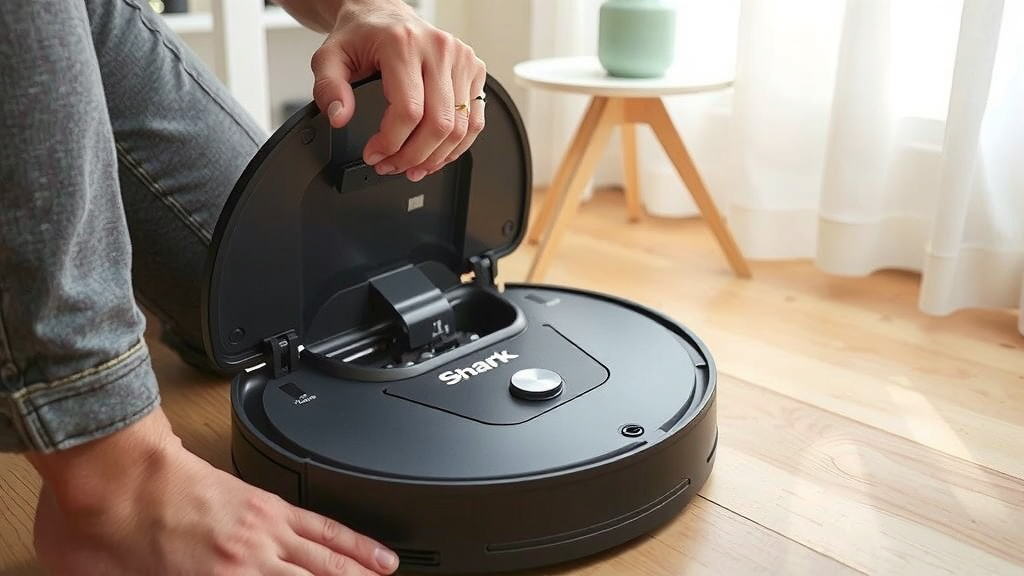
First, you need to find the dustbin. On most Shark Matrix robots, you’ll find it located on the top or back of the unit. Look for a button or a latch that releases the bin. Sometimes, you might need to gently pull the bin straight out. Check your robot’s specific design; a quick glance at the user manual can save you a moment of searching. It usually slides out with a satisfying click or pull.
Disposing of the Contents
Once the dustbin is free, take it over to your trash can. You’ll see an opening, often with a lid, where all the collected debris goes. Gently tip the bin over the trash can. Most bins are designed so the dirt falls out easily. Be prepared for a bit of dust – it’s a sign your robot has been working hard! For any stubborn bits, a gentle tap usually does the trick. Many experts recommend emptying the bin directly into the trash to avoid making a mess.
Cleaning the Dustbin Filter
While you have the dustbin out, it’s a great time to check the filter. Most Shark Matrix models have a washable filter. You can usually remove it from the dustbin. Gently tap the filter against the side of the trash can to remove excess dust. If it looks really grimy, you can rinse it under cool water. Make sure to let it air dry completely before putting it back. Putting a damp filter back can lead to mold and affect suction.
According to guidelines from cleaning experts, filters should be cleaned regularly. This can be weekly or bi-weekly depending on your home’s dust levels. A clean filter means better airflow, which directly impacts your robot’s suction power (iBuyer research).
Reattaching the Dustbin
Now for the final step: putting the dustbin back. Align the bin with its slot on the robot. You should feel or hear a click as it locks into place. Give it a gentle tug to make sure it’s securely attached. A properly seated dustbin is essential for your robot to function correctly and prevent dust from escaping back onto your floors.
Troubleshooting Common Dustbin Issues
Sometimes, things don’t go as smoothly as planned. Here are a few common hiccups and how to fix them:
Dustbin Won’t Detach
If the dustbin feels stuck, don’t force it too hard. Check for any debris or tangled hair around the release mechanism. Sometimes, a small piece of dirt can get lodged. Try gently wiggling the bin as you press the release button. If it’s still stubborn, a quick look at your robot’s manual can show you any specific tricks for your model.
Dirt Not Emptying Completely
Occasionally, some debris might cling to the inside of the dustbin. This is especially true for lighter materials like pet hair or fine dust. You can use a soft brush, like an old toothbrush, to gently loosen any stuck-on particles. Avoid using abrasive materials that could scratch the inside of the bin. For particularly stubborn dust, a slightly damp cloth can help, but remember to let it dry fully.
Error Messages Related to the Dustbin
If your robot displays an error message about the dustbin (e.g., “Bin Full” or “Bin Error”), it usually means the robot can’t detect the bin properly or it’s not seated correctly. The first thing to do is remove and reinsert the dustbin, ensuring it clicks into place. Make sure the sensors on both the robot and the bin are clean and free of debris. Often, this simple reset clears the error.
A Quick Checklist for Dustbin Maintenance
Here’s a handy checklist to keep your Shark Matrix robot vacuum’s dustbin in top shape:
- Check the bin after every 1-2 cleaning cycles.
- Listen for alerts from the robot or app indicating a full bin.
- Gently remove the dustbin using the release button/latch.
- Empty contents directly into your trash can.
- Clean or rinse the filter (if washable) and ensure it’s dry.
- Securely reattach the dustbin until it clicks.
Why Regular Dustbin Emptying Matters
You might think, “Does it really make a difference?” The answer is a resounding yes! A full dustbin is like trying to breathe through a stuffy nose – it’s just not as effective. When the bin is full, the suction power of your robot is significantly reduced. This means it can’t pick up as much dirt, dust, and debris. You might end up with missed spots and floors that aren’t truly clean. Research has shown that maintaining adequate suction is key to effective floor cleaning (National Institutes of Health).
Furthermore, a perpetually full dustbin can put a strain on your robot’s motor. Over time, this could lead to premature wear and tear. Think of it like constantly overloading a small engine; it’s just not built for that kind of stress. Keeping the bin empty allows the motor to work efficiently, extending the lifespan of your beloved robot helper. It’s a simple act of care that pays off!
Conclusion
You’ve now got the full picture on how to keep your Shark Matrix robot vacuum’s dustbin clean and ready to go. It’s a simple step that makes a big difference for your robot’s cleaning power and longevity. Remember to check the bin regularly, empty it carefully, and give that filter a little attention when needed. By making this a regular habit, you’ll ensure your robot continues to do its best work, keeping your home spotless with minimal effort.
Your next step? Make it a routine to check the dustbin after every couple of cleaning cycles. You’ll be glad you did!
Frequently Asked Questions
How often should I really empty the Shark Matrix robot vacuum’s dustbin?
It’s best to empty the dustbin after every 1-2 cleaning cycles, or whenever your robot alerts you that it’s full. This ensures optimal suction power. If you have pets or a particularly dusty home, you might need to empty it even more frequently.
Can I wash the Shark Matrix robot vacuum’s dustbin and filter?
Most Shark Matrix robot dustbins are designed to be emptied by tipping them out. While the dustbin itself usually isn’t washed, the filter is often washable. Always check your specific model’s manual. If washable, make sure to let the filter air dry completely before reinserting it.
What if my Shark Matrix robot vacuum gives me a “Bin Full” error even after I empty it?
This error usually means the bin isn’t detected correctly or isn’t seated properly. First, remove and reattach the dustbin, ensuring it clicks securely into place. Also, check that the sensors on both the robot and the bin are clean and free of any debris.
My Shark Matrix robot’s dustbin is hard to detach, what should I do?
If the dustbin feels stuck, don’t force it. Look for any small debris or hair that might be caught around the release mechanism. Gently wiggle the bin while pressing the release button. A quick look at your robot’s manual can also provide model-specific tips for detachment.
How do I prevent dust from escaping when I empty the Shark Matrix robot vacuum’s dustbin?
To minimize dust escape, empty the bin directly over your trash can. A gentle tip is usually enough. For any stubborn debris clinging inside, a soft brush can help loosen it before you empty. Holding the bin close to the trash can also helps contain any stray dust particles.
![7 Best Robot Vacuum For Carpet And Tile [2026]](https://robotvacuumfact.com/wp-content/uploads/2026/08/7-best-robot-vacuum-for-carpet-and-tile-2026-featured-768x432.jpg)